Resources
Blog
Work Order Management: A Practical Guide
Blog
December 23, 2025
5
 min read

Work Order Management: A Practical Guide

Work Order Management: A Practical Guide

In this post

1
Work order management enables large facilities to control maintenance demand, technician time, and asset uptime at scale.
2
Clear separation between work requests and work orders reduces delays, rework, and missed priorities.
3
CMMS and EAM systems rely on accurate work order data to support compliance, planning, and long-term decisions.
By the numbers

1

Work order management enables large facilities to control maintenance demand, technician time, and asset uptime at scale.

2

Clear separation between work requests and work orders reduces delays, rework, and missed priorities.

3

CMMS and EAM systems rely on accurate work order data to support compliance, planning, and long-term decisions.
Resources
eBooks & Whitepapers
Work Order Management: A Practical Guide
Blog
Work Order Management: A Practical Guide

Learn how to manage work orders across complex facilities from request to completion. Explore benefits, applications, and best practices.

Work order management: A complete guide

Maintenance teams in large facilities face constant pressure: requests come from every direction, equipment issues compete with compliance tasks, and staffing rarely keeps pace with the workload. When teams lack a consistent way to move work from intake to closure, small problems pile up, priorities blur, and leadership loses visibility into what’s getting done and what’s falling behind.

Work order management sits at the center of that challenge. It shapes how work gets requested, approved, assigned, tracked, and documented across buildings, departments, and systems. When the process breaks down, teams lose time, miss priorities, and struggle to explain outcomes to leadership.

This guide breaks down how work order management software works in complex organizations, from request intake to the closeout data teams can use. It covers the core elements of a strong program, the whole process lifecycle, practical applications across industries, and the role CMMS and EAM systems play in supporting day-to-day execution and long-term planning. The goal stays practical: regain control, improve uptime, and make decisions based on the work your team already performs.

Industry momentum reflects that focus. According to Grand View Research’s Work Order Management Systems Market Size Report, the work order management systems market continues to grow as asset-intensive industries accelerate digital operations.

What is work order management?

Work order management is the process for capturing, prioritizing, assigning, executing, and documenting maintenance work from initial request through completion. It turns reported issues and planned tasks into actionable work orders that technicians can complete, track, and close with clear records.

Work order management software centralizes maintenance requests into a single workflow. Requests entered through a defined intake point are routed through review and prioritization and converted into work orders, with scope, labor, materials, and timelines documented consistently. That structure helps teams allocate technician time with fewer handoffs, reduce downtime, and build reliable asset histories.

A work request records a reported need, such as a broken fixture, a temperature complaint, or an equipment alert. A work order authorizes the work and defines what needs to happen, including assignments, instructions, parts, and documentation requirements. In large or regulated facilities, clear work-order management prevents routine issues from becoming operational, safety, or compliance problems.

Many organizations manage this workflow through dedicated work order management software that connects requests, assets, and labor in one system. Daily execution often runs through CMMS software while enterprise asset management software builds on work order data to support lifecycle planning, compliance reporting, budgeting, and long-term investment decisions.

Core elements of an effective work order management program

Strong work order management relies on more than a form and a queue. It depends on clear intake, consistent structure, and reliable data flow from request to closure. Each element plays a role in keeping teams focused, audits defensible, and decisions grounded in real activity.

A defined request intake captures what needs attention and filters noise before work reaches technicians. Standardized work orders translate those requests into actionable tasks with scope, priority, labor, and materials clearly documented. Assignment and scheduling rules keep work aligned with skill sets and availability. Execution-tracking records progress as work occurs, giving supervisors real-time visibility. Documentation at closeout builds an accurate maintenance history that supports compliance reviews, asset planning, and cost analysis.

When these elements work together, teams reduce duplicate effort, improve response times, and gain confidence in their data. Gaps between them create blind spots. Confusion at intake slows response. Incomplete documentation weakens reporting. Inconsistent structure limits the value of analytics later on. The foundation starts with understanding the difference between a work request and a work order.

Work orders vs. work requests

A work request captures a reported issue or need. A work order authorizes and defines the work required to address it. Treating these as the same step creates delays, rework, and missed priorities.

The lifecycle starts when a user submits a request. That request describes the problem, location, and urgency. A supervisor reviews it, confirms the scope, and assigns priority. Once approved, the request converts into a formal work order with assigned technicians, scheduled time, required parts, and documentation requirements. The work order then moves through execution, tracking, and closeout.

Clear separation matters in practice. In higher education, a student reports a broken HVAC unit in a residence hall. The request captures location and comfort impact. The work order defines diagnostics, labor, and parts. In healthcare, staff submit a request for equipment calibration. The work order adds compliance steps and documentation. In manufacturing, a machine operator flags a breakdown. The work order assigns the right trade, schedules downtime, and tracks repair costs.

When teams skip this structure, requests land directly in technician queues without review. Work stalls, priorities conflict, and teams repeat work due to missing details.

Types of work orders

Different types of work demand different planning, timing, and data. A clear work order program accounts for each type and routes them appropriately.

Reactive work orders

Reactive work orders address unplanned issues that disrupt operations. Examples include equipment failures, safety hazards, or unexpected outages. These orders demand fast response and clear escalation paths. High volumes signal gaps in preventive planning and asset reliability.

Preventive work orders

Preventive work orders schedule recurring maintenance tasks based on time, usage, or condition thresholds. These tasks reduce the need for emergency repairs and extend asset life. Teams manage this work through structured schedules and checklists supported by preventive maintenance software that ties tasks to asset history and performance.

Predictive work orders

Predictive work orders are triggered by data signals such as sensor readings, usage trends, or performance thresholds. These orders focus effort where risk is rising rather than following fixed schedules. Organizations apply this approach as maintenance programs mature, often supported through predictive maintenance software that converts data insights into actionable work.

Projects and installations

Project-based work orders manage planned installations, upgrades, and capital work. These orders track multiple tasks, longer timelines, and coordination across teams or vendors. Clear structure supports cost control, scheduling visibility, and post-project documentation.

Each work order type plays a role. Reactive work highlights risk. Preventive work stabilizes operations. Predictive work sharpens focus. Project work manages complexity. A strong program handles all four without losing clarity or control.

The complete work order management process

A transparent work order management process gives teams a repeatable way to move work from request to resolution without losing visibility or control. Each step builds on the last. Breakdowns at any point slow response times, weaken documentation, and limit the value of maintenance data.

Below is a practical view of the full work order management process in complex environments, such as campuses, hospitals, manufacturing plants, and government facilities.

Step 1: Identification and request submission

Work begins when someone identifies an issue or need and submits a request through a defined intake channel. Strong request forms capture the correct details up front, including asset, location, issue type, and urgency. That structure limits vague requests and reduces follow-up questions.

In higher education, a facilities team receives a request for a classroom HVAC issue with building and room details already attached. In healthcare, staff submit calibration requests for regulated equipment. In manufacturing, operators flag equipment faults with asset IDs and shift context.

Clear intake reduces duplicate requests, shortens response time, and prevents work from stalling before it starts.

WebTMA - Service request submission form

Step 2: Prioritization and assignment

Once submitted, requests move through review and prioritization. Systems apply rules based on asset criticality, safety impact, compliance requirements, and service level targets. Automation and AI help surface urgent work while routing routine tasks appropriately.

A hospital prioritizes life-safety and clinical equipment ahead of cosmetic repairs. A government facility routes emergency repairs to on-call teams while scheduling non-critical work during standard hours. Smart assignment matches work to technician skills and certifications, reducing handoffs and rework.

Step 3: Scheduling and dispatch

Scheduling turns approved work orders into planned action. Coordinated schedules balance labor availability, asset downtime windows, and operational demands. Dispatch tools give supervisors and technicians shared visibility into what work is active, pending, or delayed.

Manufacturing teams align maintenance windows with production schedules. Campus teams coordinate across buildings and trades. CMMS software and enterprise asset management software support this step with automated scheduling logic that adjusts as priorities shift, keeping teams accountable and informed.

Step 4: Execution and real-time tracking

Technicians complete fieldwork while updating status, labor, and parts in real time on mobile devices. Real-time tracking gives supervisors accurate progress updates without manual check-ins.

Healthcare technicians document calibration steps at the point of service. Manufacturing teams log repairs and downtime as work occurs. Government crews capture photos and notes for accountability. Mobile access keeps work moving and data current.

Step 5: Documentation and closure

Closure finalizes the work order with complete documentation. Technicians record actions taken, parts used, time spent, and follow-up needs. That data supports audits, warranty claims, and asset history reviews.

Regulated environments rely on consistent records for inspections and compliance reviews. Maintenance teams also use this data to plan future preventive tasks and spot recurring issues. Compliance tracking software supports defensible records without adding administrative burden.

Step 6: Review, analysis, and improvement

Closed work orders feed reporting and analysis. Dashboards highlight trends such as response time, backlog growth, repeat failures, and labor utilization. Leaders use this insight to adjust staffing, maintenance strategies, and capital plans.

WebTMA dashboards surface KPIs that reveal bottlenecks and opportunities for improvement across facilities. Teams often identify recurring asset failures, rising emergency work, or trade-specific backlogs during these reviews. Maintenance reporting and analytics turn daily work into actionable insight that guides preventive maintenance planning and long-term decisions.

A disciplined work order management process keeps operations steady, documentation reliable, and data ready for the next decision.

Learn how a 21,000-student university uses WebTMA to scale work order management, improve efficiency, and support campus-wide operations.

Benefits of work order management

Work order management enables organizations to control how maintenance work affects operations, risk, and costs. Strong programs help teams move beyond reacting to individual tasks and start managing work as a connected system. While the details vary by industry, the outcomes tend to look the same: fewer surprises, clearer priorities, and better use of limited resources. That consistency explains why work order management applications play such a central role across healthcare, education, manufacturing, and government environments.

Operational control

Clear work order management improves how teams plan, execute, and track daily maintenance work across facilities.

Improved operational efficiency and wrench time

Well-structured workflows reduce idle time and minimize back-and-forth due to incomplete information. Technicians spend more time completing work instead of tracking down details, while supervisors gain a live view of active and overdue work orders across buildings or production lines. That visibility helps balance workloads and address delays before they turn into backlogs.
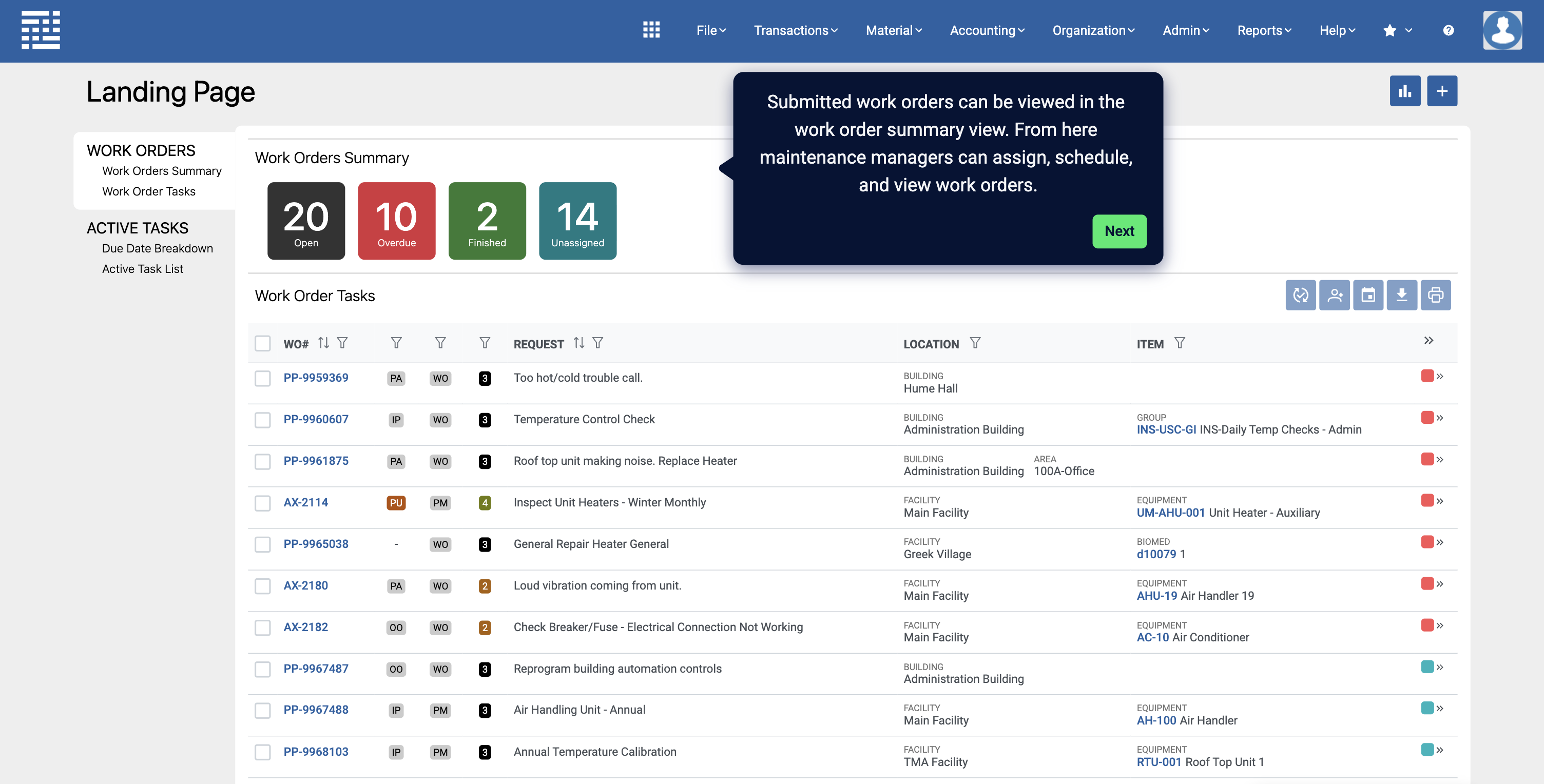
WebTMA - Dashboard displaying active & overdue work orders

Increased technician productivity and accountability

Mobile access allows technicians to receive assignments, document work, and close orders in the field. That access keeps maintenance workflows moving and reduces manual follow-up. One university team reported faster response times and more transparent accountability across shifts after adopting mobile access to work orders.

Visibility across teams and facilities

Centralized work order views help leaders track progress across departments, locations, and trades. Education teams use this visibility to manage campus-wide demand, while manufacturing teams rely on it to coordinate maintenance work with production schedules.

Risk, compliance, and accountability

Consistent work order records support audits, inspections, and safety programs in regulated environments.

Los Angeles County DHS uses EQ2 HEMS to unify work order management, standardize compliance, and manage regulated medical equipment across a multi-hospital enterprise.

Centralized data for reporting and audits

Work order histories create a defensible record of what work was performed, when it occurred, and who completed it. Audits move faster when documentation stays consistent and accessible. Access to detailed historical data also supports informed decision-making during planning cycles and capital discussions.

Compliance and safety support

Regulated organizations depend on accurate maintenance records to meet inspection and safety requirements. Healthcare facilities track calibration and safety checks tied to specific assets. Government agencies rely on documented response times and corrective actions. 

Regulatory and industry guidance reinforce the importance of reliable maintenance documentation as part of broader safety programs. For example, OSHA’s recordkeeping requirements under 29 CFR 1904 and IFMA’s facility management competencies both emphasize documentation as a foundation for safe and compliant operations.

Consistent documentation practices

Standardized closeout steps reduce record gaps. Teams capture labor, materials, and outcomes in a consistent format that supports internal reviews and external audits across healthcare and public-sector environments.

Financial and strategic value

Work order data supports smarter budgeting, staffing, and long-term planning.

Cost reduction and resource optimization

Accurate work order data shows where money and labor go. Teams track material usage, overtime, and repeat repairs to identify cost drivers. TMA Systems supports this analysis through built-in cost-tracking capabilities that help organizations allocate budgets more effectively across facilities.

Proactive resource management

Work order trends guide staffing and maintenance planning. Manufacturing organizations use this insight to reduce emergency repairs, while education and government teams apply it to plan seasonal work and capital projects across portfolios.

Improved data and reporting

Reliable work order data feeds reporting that support long-term decisions. Leaders rely on measurable trends rather than anecdotes when shaping maintenance strategies. Many organizations review the best work order management software resources during evaluation to confirm that reporting capabilities align with operational needs.

When teams treat work order management as a core operational discipline rather than a task list, the value extends across industries, from manufacturing to government facilities.

Vistaprint’s manufacturing teams use MEX CMMS to bring consistency, visibility, and control to work order management at production scale. Read the case study to see how these benefits translate into daily operations.

CMMS and EAM: The work order management applications

Work order management sits at the center of how maintenance work gets planned, executed, and recorded. CMMS and EAM systems both rely on that process, but they apply it at different levels of the organization. Understanding how these systems relate helps teams choose tools that fit their operational reality rather than adding unnecessary complexity.

A Computerized Maintenance Management System (CMMS) manages daily maintenance activity. CMMS software captures work orders, schedules labor, tracks assets, and supports preventive programs. It focuses on execution and visibility across facilities and teams. Organizations often explore this layer further when learning what is cmms and how it supports maintenance operations.

Enterprise Asset Management expands that scope. Enterprise asset management software builds on CMMS data to support asset lifecycle planning, compliance programs, budgeting, and long-term capital decisions. Leaders turn to EAM when they need portfolio-level insight across service areas and time horizons, often after reviewing what is enterprise asset management and its role in enterprise planning.

Work orders remain the operational layer inside both systems. Every inspection, repair, calibration, and project task flows through that structure. Accurate work order data connects technician activity to asset performance, compliance records, and financial outcomes. TMA brings decades of experience helping organizations connect this operational work to strategic decisions without losing clarity or control.

Why these terms cause confusion

Many organizations treat work order management, CMMS, and EAM as interchangeable. That confusion leads teams to buy systems that exceed current needs or fall short of future requirements. A clear understanding of work order management as the foundation helps organizations select the right level of system and scale intentionally over time. Guidance from resources such as best CMMS software and the best enterprise software often reinforces the importance of matching system scope to operational maturity.

How these systems work together

System Level Definition Scope Relationship Key Functions Typical Users
Work Order Management (WOM) Process that captures, assigns, and completes maintenance tasks from request through closure. Operational tasks and technician-level actions. Operational layer inside CMMS and EAM systems. Task execution, technician time tracking, and resource allocation. Technicians, requesters, and maintenance staff.
Computerized Maintenance Management System (CMMS) Software that manages and optimizes work orders, scheduling, preventive maintenance, and asset data. Maintenance and asset management across facilities or departments. Manages WOM data and supports daily maintenance operations. Maintenance efficiency, uptime improvement, scheduling, and workflow management. Maintenance managers, supervisors, and operations leaders.
Enterprise Asset Management (EAM) Enterprise framework for managing the full lifecycle of assets. Enterprise-wide asset oversight across multiple service areas. Strategic layer that uses CMMS data for planning and decision-making. Asset value optimization, risk management, long-term planning, and capital forecasting. Facilities directors, operations executives, finance, and compliance leaders.
Compare the best work order management software across CMMS and EAM platforms to identify the right fit based on scale, assets, and operational complexity.

Work order management best practices

Teams often struggle with work order management due to fragmented processes, not a lack of effort. Multiple intake channels, inconsistent prioritization, limited feedback loops, and incomplete documentation create friction that compounds over time. Addressing these gaps brings immediate improvement.

  • Centralize requests in one system: Route all maintenance requests through a single platform with self-service access. Mobile-friendly forms capture consistent details and reduce informal work requests that bypass tracking.
  • Assign work based on skill and context: Match tasks to the right technician or team using asset type, certifications, and availability. Clear ownership reduces handoffs and repeat visits.
  • Provide access to asset information: Give technicians visibility into asset history, manuals, parts inventory, and checklists at the point of work. Better context shortens diagnosis time and improves repair quality.
  • Standardize work with checklists: Use task checklists for recurring work and regulated procedures. Consistent steps support quality control and documentation across teams.
  • Leverage mobile tools: Mobile CMMS access supports real-time updates, geo-location, and faster closeouts. Field teams stay connected without returning to workstations.
  • Record complete work histories: Capture labor, materials, findings, and outcomes for every work order. Accurate records support audits, planning, and data-driven decisions.
  • Prioritize work with intent: Separate reactive, preventive, and emergency work using defined rules. Clear prioritization keeps urgent work visible without overwhelming teams.
See how the University of Alabama at Birmingham improved work order response times and technician productivity with WebTMA.

The TMA Systems difference: Specialized work order solutions

TMA approaches work order management as a core operational discipline within modern facility management. Decades of experience across complex environments shape how TMA helps maintenance departments manage work with clarity, accountability, and data they can rely on. The focus stays on supporting real maintenance workflows without forcing teams into rigid processes or unnecessary complexity.

WebTMA supports organizations responsible for large portfolios, regulated assets, and multi-trade teams. It provides a structured work order system that scales across campuses, healthcare systems, manufacturing operations, and government facilities. Maintenance departments use WebTMA to manage the whole work order process, coordinate labor, track inventory management alongside work orders, and maintain consistent documentation and reporting across facilities. Configurable workflows allow teams to align the system to how work actually moves through their organization.

MEX CMMS serves teams that need a streamlined approach to daily execution and field service management. It supports core work order management, scheduling, and asset tracking through an intuitive interface designed for adoption. Maintenance teams use MEX CMMS to manage work orders, update status in real time through a mobile app, and keep maintenance workflows moving without adding administrative overhead.

EQ2 HEMS addresses the needs of healthcare technology management teams working in regulated environments. It supports work order management tied directly to medical equipment, calibration schedules, compliance requirements, and inventory management for critical devices. The platform helps teams maintain traceability, accuracy, and audit-ready records as part of their broader facility management responsibilities.

Across all platforms, TMA Systems acts as a long-term partner. Implementation teams guide configuration, adoption, and ongoing optimization so the work order system continues to support evolving operational needs. The goal remains practical: help maintenance departments manage work orders in a way that aligns with how facilities operate today and how they plan to grow tomorrow.

Complex operations demand more than basic work order tools. TMA Systems offers purpose-built work order management solutions that scale with your operational demands.

FAQs for work order management

What is a work order management system used for?

A work order management system helps maintenance departments capture requests, manage the work order lifecycle, and track execution through closure. Teams use it to coordinate labor, document work, support inventory management, and maintain accurate asset histories across facilities.

Why is work order management important for large or regulated organizations?

Large and regulated organizations depend on consistent maintenance workflows and defensible records. Work order management supports visibility, accountability, and documentation required for audits, safety programs, and operational oversight within facility management programs.

How does work order management support preventive and predictive maintenance?

Work order data highlights patterns in asset performance and maintenance demand. Maintenance teams use this insight to schedule preventive work and trigger predictive actions before failures disrupt operations.

What types of organizations benefit most from work order management software?

Organizations with multiple facilities, regulated assets, or limited maintenance resources benefit the most. Education, healthcare, manufacturing, and government teams rely on structured work order systems to manage complexity and coordinate field service management effectively.

How does work order management relate to CMMS and EAM?

Work order management forms the operational foundation within CMMS and EAM platforms. CMMS supports daily execution and maintenance workflows, while EAM builds on that data to support lifecycle planning, compliance, and enterprise-level decisions.

Why choose TMA Systems for work order management?

TMA brings over 30 years of experience supporting facility management and maintenance teams at scale. The platforms adapt to real operational needs, support mobile and field teams through a mobile app, and follow a partner-first approach focused on long-term success.

Key Insights You'll Gain:
  • Work order management enables large facilities to control maintenance demand, technician time, and asset uptime at scale.
  • Clear separation between work requests and work orders reduces delays, rework, and missed priorities.
  • CMMS and EAM systems rely on accurate work order data to support compliance, planning, and long-term decisions.

Download the eBook now

You’re all set!

Your eBook is on its way to your inbox. We hope it brings fresh insights and practical takeaways to help you get more from your maintenance operations.

Explore related resources

Resources
Blog
Work Order Management: A Practical Guide
Resources
eBooks & Whitepapers
Work Order Management: A Practical Guide
Blog
Work Order Management: A Practical Guide

Learn how to manage work orders across complex facilities from request to completion. Explore benefits, applications, and best practices.

December 23, 2025

Work order management: A complete guide

Maintenance teams in large facilities face constant pressure: requests come from every direction, equipment issues compete with compliance tasks, and staffing rarely keeps pace with the workload. When teams lack a consistent way to move work from intake to closure, small problems pile up, priorities blur, and leadership loses visibility into what’s getting done and what’s falling behind.

Work order management sits at the center of that challenge. It shapes how work gets requested, approved, assigned, tracked, and documented across buildings, departments, and systems. When the process breaks down, teams lose time, miss priorities, and struggle to explain outcomes to leadership.

This guide breaks down how work order management software works in complex organizations, from request intake to the closeout data teams can use. It covers the core elements of a strong program, the whole process lifecycle, practical applications across industries, and the role CMMS and EAM systems play in supporting day-to-day execution and long-term planning. The goal stays practical: regain control, improve uptime, and make decisions based on the work your team already performs.

Industry momentum reflects that focus. According to Grand View Research’s Work Order Management Systems Market Size Report, the work order management systems market continues to grow as asset-intensive industries accelerate digital operations.

What is work order management?

Work order management is the process for capturing, prioritizing, assigning, executing, and documenting maintenance work from initial request through completion. It turns reported issues and planned tasks into actionable work orders that technicians can complete, track, and close with clear records.

Work order management software centralizes maintenance requests into a single workflow. Requests entered through a defined intake point are routed through review and prioritization and converted into work orders, with scope, labor, materials, and timelines documented consistently. That structure helps teams allocate technician time with fewer handoffs, reduce downtime, and build reliable asset histories.

A work request records a reported need, such as a broken fixture, a temperature complaint, or an equipment alert. A work order authorizes the work and defines what needs to happen, including assignments, instructions, parts, and documentation requirements. In large or regulated facilities, clear work-order management prevents routine issues from becoming operational, safety, or compliance problems.

Many organizations manage this workflow through dedicated work order management software that connects requests, assets, and labor in one system. Daily execution often runs through CMMS software while enterprise asset management software builds on work order data to support lifecycle planning, compliance reporting, budgeting, and long-term investment decisions.

Core elements of an effective work order management program

Strong work order management relies on more than a form and a queue. It depends on clear intake, consistent structure, and reliable data flow from request to closure. Each element plays a role in keeping teams focused, audits defensible, and decisions grounded in real activity.

A defined request intake captures what needs attention and filters noise before work reaches technicians. Standardized work orders translate those requests into actionable tasks with scope, priority, labor, and materials clearly documented. Assignment and scheduling rules keep work aligned with skill sets and availability. Execution-tracking records progress as work occurs, giving supervisors real-time visibility. Documentation at closeout builds an accurate maintenance history that supports compliance reviews, asset planning, and cost analysis.

When these elements work together, teams reduce duplicate effort, improve response times, and gain confidence in their data. Gaps between them create blind spots. Confusion at intake slows response. Incomplete documentation weakens reporting. Inconsistent structure limits the value of analytics later on. The foundation starts with understanding the difference between a work request and a work order.

Work orders vs. work requests

A work request captures a reported issue or need. A work order authorizes and defines the work required to address it. Treating these as the same step creates delays, rework, and missed priorities.

The lifecycle starts when a user submits a request. That request describes the problem, location, and urgency. A supervisor reviews it, confirms the scope, and assigns priority. Once approved, the request converts into a formal work order with assigned technicians, scheduled time, required parts, and documentation requirements. The work order then moves through execution, tracking, and closeout.

Clear separation matters in practice. In higher education, a student reports a broken HVAC unit in a residence hall. The request captures location and comfort impact. The work order defines diagnostics, labor, and parts. In healthcare, staff submit a request for equipment calibration. The work order adds compliance steps and documentation. In manufacturing, a machine operator flags a breakdown. The work order assigns the right trade, schedules downtime, and tracks repair costs.

When teams skip this structure, requests land directly in technician queues without review. Work stalls, priorities conflict, and teams repeat work due to missing details.

Types of work orders

Different types of work demand different planning, timing, and data. A clear work order program accounts for each type and routes them appropriately.

Reactive work orders

Reactive work orders address unplanned issues that disrupt operations. Examples include equipment failures, safety hazards, or unexpected outages. These orders demand fast response and clear escalation paths. High volumes signal gaps in preventive planning and asset reliability.

Preventive work orders

Preventive work orders schedule recurring maintenance tasks based on time, usage, or condition thresholds. These tasks reduce the need for emergency repairs and extend asset life. Teams manage this work through structured schedules and checklists supported by preventive maintenance software that ties tasks to asset history and performance.

Predictive work orders

Predictive work orders are triggered by data signals such as sensor readings, usage trends, or performance thresholds. These orders focus effort where risk is rising rather than following fixed schedules. Organizations apply this approach as maintenance programs mature, often supported through predictive maintenance software that converts data insights into actionable work.

Projects and installations

Project-based work orders manage planned installations, upgrades, and capital work. These orders track multiple tasks, longer timelines, and coordination across teams or vendors. Clear structure supports cost control, scheduling visibility, and post-project documentation.

Each work order type plays a role. Reactive work highlights risk. Preventive work stabilizes operations. Predictive work sharpens focus. Project work manages complexity. A strong program handles all four without losing clarity or control.

The complete work order management process

A transparent work order management process gives teams a repeatable way to move work from request to resolution without losing visibility or control. Each step builds on the last. Breakdowns at any point slow response times, weaken documentation, and limit the value of maintenance data.

Below is a practical view of the full work order management process in complex environments, such as campuses, hospitals, manufacturing plants, and government facilities.

Step 1: Identification and request submission

Work begins when someone identifies an issue or need and submits a request through a defined intake channel. Strong request forms capture the correct details up front, including asset, location, issue type, and urgency. That structure limits vague requests and reduces follow-up questions.

In higher education, a facilities team receives a request for a classroom HVAC issue with building and room details already attached. In healthcare, staff submit calibration requests for regulated equipment. In manufacturing, operators flag equipment faults with asset IDs and shift context.

Clear intake reduces duplicate requests, shortens response time, and prevents work from stalling before it starts.

WebTMA - Service request submission form

Step 2: Prioritization and assignment

Once submitted, requests move through review and prioritization. Systems apply rules based on asset criticality, safety impact, compliance requirements, and service level targets. Automation and AI help surface urgent work while routing routine tasks appropriately.

A hospital prioritizes life-safety and clinical equipment ahead of cosmetic repairs. A government facility routes emergency repairs to on-call teams while scheduling non-critical work during standard hours. Smart assignment matches work to technician skills and certifications, reducing handoffs and rework.

Step 3: Scheduling and dispatch

Scheduling turns approved work orders into planned action. Coordinated schedules balance labor availability, asset downtime windows, and operational demands. Dispatch tools give supervisors and technicians shared visibility into what work is active, pending, or delayed.

Manufacturing teams align maintenance windows with production schedules. Campus teams coordinate across buildings and trades. CMMS software and enterprise asset management software support this step with automated scheduling logic that adjusts as priorities shift, keeping teams accountable and informed.

Step 4: Execution and real-time tracking

Technicians complete fieldwork while updating status, labor, and parts in real time on mobile devices. Real-time tracking gives supervisors accurate progress updates without manual check-ins.

Healthcare technicians document calibration steps at the point of service. Manufacturing teams log repairs and downtime as work occurs. Government crews capture photos and notes for accountability. Mobile access keeps work moving and data current.

Step 5: Documentation and closure

Closure finalizes the work order with complete documentation. Technicians record actions taken, parts used, time spent, and follow-up needs. That data supports audits, warranty claims, and asset history reviews.

Regulated environments rely on consistent records for inspections and compliance reviews. Maintenance teams also use this data to plan future preventive tasks and spot recurring issues. Compliance tracking software supports defensible records without adding administrative burden.

Step 6: Review, analysis, and improvement

Closed work orders feed reporting and analysis. Dashboards highlight trends such as response time, backlog growth, repeat failures, and labor utilization. Leaders use this insight to adjust staffing, maintenance strategies, and capital plans.

WebTMA dashboards surface KPIs that reveal bottlenecks and opportunities for improvement across facilities. Teams often identify recurring asset failures, rising emergency work, or trade-specific backlogs during these reviews. Maintenance reporting and analytics turn daily work into actionable insight that guides preventive maintenance planning and long-term decisions.

A disciplined work order management process keeps operations steady, documentation reliable, and data ready for the next decision.

Learn how a 21,000-student university uses WebTMA to scale work order management, improve efficiency, and support campus-wide operations.

Benefits of work order management

Work order management enables organizations to control how maintenance work affects operations, risk, and costs. Strong programs help teams move beyond reacting to individual tasks and start managing work as a connected system. While the details vary by industry, the outcomes tend to look the same: fewer surprises, clearer priorities, and better use of limited resources. That consistency explains why work order management applications play such a central role across healthcare, education, manufacturing, and government environments.

Operational control

Clear work order management improves how teams plan, execute, and track daily maintenance work across facilities.

Improved operational efficiency and wrench time

Well-structured workflows reduce idle time and minimize back-and-forth due to incomplete information. Technicians spend more time completing work instead of tracking down details, while supervisors gain a live view of active and overdue work orders across buildings or production lines. That visibility helps balance workloads and address delays before they turn into backlogs.

WebTMA - Dashboard displaying active & overdue work orders

Increased technician productivity and accountability

Mobile access allows technicians to receive assignments, document work, and close orders in the field. That access keeps maintenance workflows moving and reduces manual follow-up. One university team reported faster response times and more transparent accountability across shifts after adopting mobile access to work orders.

Visibility across teams and facilities

Centralized work order views help leaders track progress across departments, locations, and trades. Education teams use this visibility to manage campus-wide demand, while manufacturing teams rely on it to coordinate maintenance work with production schedules.

Risk, compliance, and accountability

Consistent work order records support audits, inspections, and safety programs in regulated environments.

Los Angeles County DHS uses EQ2 HEMS to unify work order management, standardize compliance, and manage regulated medical equipment across a multi-hospital enterprise.

Centralized data for reporting and audits

Work order histories create a defensible record of what work was performed, when it occurred, and who completed it. Audits move faster when documentation stays consistent and accessible. Access to detailed historical data also supports informed decision-making during planning cycles and capital discussions.

Compliance and safety support

Regulated organizations depend on accurate maintenance records to meet inspection and safety requirements. Healthcare facilities track calibration and safety checks tied to specific assets. Government agencies rely on documented response times and corrective actions. 

Regulatory and industry guidance reinforce the importance of reliable maintenance documentation as part of broader safety programs. For example, OSHA’s recordkeeping requirements under 29 CFR 1904 and IFMA’s facility management competencies both emphasize documentation as a foundation for safe and compliant operations.

Consistent documentation practices

Standardized closeout steps reduce record gaps. Teams capture labor, materials, and outcomes in a consistent format that supports internal reviews and external audits across healthcare and public-sector environments.

Financial and strategic value

Work order data supports smarter budgeting, staffing, and long-term planning.

Cost reduction and resource optimization

Accurate work order data shows where money and labor go. Teams track material usage, overtime, and repeat repairs to identify cost drivers. TMA Systems supports this analysis through built-in cost-tracking capabilities that help organizations allocate budgets more effectively across facilities.

Proactive resource management

Work order trends guide staffing and maintenance planning. Manufacturing organizations use this insight to reduce emergency repairs, while education and government teams apply it to plan seasonal work and capital projects across portfolios.

Improved data and reporting

Reliable work order data feeds reporting that support long-term decisions. Leaders rely on measurable trends rather than anecdotes when shaping maintenance strategies. Many organizations review the best work order management software resources during evaluation to confirm that reporting capabilities align with operational needs.

When teams treat work order management as a core operational discipline rather than a task list, the value extends across industries, from manufacturing to government facilities.

Vistaprint’s manufacturing teams use MEX CMMS to bring consistency, visibility, and control to work order management at production scale. Read the case study to see how these benefits translate into daily operations.

CMMS and EAM: The work order management applications

Work order management sits at the center of how maintenance work gets planned, executed, and recorded. CMMS and EAM systems both rely on that process, but they apply it at different levels of the organization. Understanding how these systems relate helps teams choose tools that fit their operational reality rather than adding unnecessary complexity.

A Computerized Maintenance Management System (CMMS) manages daily maintenance activity. CMMS software captures work orders, schedules labor, tracks assets, and supports preventive programs. It focuses on execution and visibility across facilities and teams. Organizations often explore this layer further when learning what is cmms and how it supports maintenance operations.

Enterprise Asset Management expands that scope. Enterprise asset management software builds on CMMS data to support asset lifecycle planning, compliance programs, budgeting, and long-term capital decisions. Leaders turn to EAM when they need portfolio-level insight across service areas and time horizons, often after reviewing what is enterprise asset management and its role in enterprise planning.

Work orders remain the operational layer inside both systems. Every inspection, repair, calibration, and project task flows through that structure. Accurate work order data connects technician activity to asset performance, compliance records, and financial outcomes. TMA brings decades of experience helping organizations connect this operational work to strategic decisions without losing clarity or control.

Why these terms cause confusion

Many organizations treat work order management, CMMS, and EAM as interchangeable. That confusion leads teams to buy systems that exceed current needs or fall short of future requirements. A clear understanding of work order management as the foundation helps organizations select the right level of system and scale intentionally over time. Guidance from resources such as best CMMS software and the best enterprise software often reinforces the importance of matching system scope to operational maturity.

How these systems work together

System Level Definition Scope Relationship Key Functions Typical Users
Work Order Management (WOM) Process that captures, assigns, and completes maintenance tasks from request through closure. Operational tasks and technician-level actions. Operational layer inside CMMS and EAM systems. Task execution, technician time tracking, and resource allocation. Technicians, requesters, and maintenance staff.
Computerized Maintenance Management System (CMMS) Software that manages and optimizes work orders, scheduling, preventive maintenance, and asset data. Maintenance and asset management across facilities or departments. Manages WOM data and supports daily maintenance operations. Maintenance efficiency, uptime improvement, scheduling, and workflow management. Maintenance managers, supervisors, and operations leaders.
Enterprise Asset Management (EAM) Enterprise framework for managing the full lifecycle of assets. Enterprise-wide asset oversight across multiple service areas. Strategic layer that uses CMMS data for planning and decision-making. Asset value optimization, risk management, long-term planning, and capital forecasting. Facilities directors, operations executives, finance, and compliance leaders.
Compare the best work order management software across CMMS and EAM platforms to identify the right fit based on scale, assets, and operational complexity.

Work order management best practices

Teams often struggle with work order management due to fragmented processes, not a lack of effort. Multiple intake channels, inconsistent prioritization, limited feedback loops, and incomplete documentation create friction that compounds over time. Addressing these gaps brings immediate improvement.

  • Centralize requests in one system: Route all maintenance requests through a single platform with self-service access. Mobile-friendly forms capture consistent details and reduce informal work requests that bypass tracking.
  • Assign work based on skill and context: Match tasks to the right technician or team using asset type, certifications, and availability. Clear ownership reduces handoffs and repeat visits.
  • Provide access to asset information: Give technicians visibility into asset history, manuals, parts inventory, and checklists at the point of work. Better context shortens diagnosis time and improves repair quality.
  • Standardize work with checklists: Use task checklists for recurring work and regulated procedures. Consistent steps support quality control and documentation across teams.
  • Leverage mobile tools: Mobile CMMS access supports real-time updates, geo-location, and faster closeouts. Field teams stay connected without returning to workstations.
  • Record complete work histories: Capture labor, materials, findings, and outcomes for every work order. Accurate records support audits, planning, and data-driven decisions.
  • Prioritize work with intent: Separate reactive, preventive, and emergency work using defined rules. Clear prioritization keeps urgent work visible without overwhelming teams.
See how the University of Alabama at Birmingham improved work order response times and technician productivity with WebTMA.

The TMA Systems difference: Specialized work order solutions

TMA approaches work order management as a core operational discipline within modern facility management. Decades of experience across complex environments shape how TMA helps maintenance departments manage work with clarity, accountability, and data they can rely on. The focus stays on supporting real maintenance workflows without forcing teams into rigid processes or unnecessary complexity.

WebTMA supports organizations responsible for large portfolios, regulated assets, and multi-trade teams. It provides a structured work order system that scales across campuses, healthcare systems, manufacturing operations, and government facilities. Maintenance departments use WebTMA to manage the whole work order process, coordinate labor, track inventory management alongside work orders, and maintain consistent documentation and reporting across facilities. Configurable workflows allow teams to align the system to how work actually moves through their organization.

MEX CMMS serves teams that need a streamlined approach to daily execution and field service management. It supports core work order management, scheduling, and asset tracking through an intuitive interface designed for adoption. Maintenance teams use MEX CMMS to manage work orders, update status in real time through a mobile app, and keep maintenance workflows moving without adding administrative overhead.

EQ2 HEMS addresses the needs of healthcare technology management teams working in regulated environments. It supports work order management tied directly to medical equipment, calibration schedules, compliance requirements, and inventory management for critical devices. The platform helps teams maintain traceability, accuracy, and audit-ready records as part of their broader facility management responsibilities.

Across all platforms, TMA Systems acts as a long-term partner. Implementation teams guide configuration, adoption, and ongoing optimization so the work order system continues to support evolving operational needs. The goal remains practical: help maintenance departments manage work orders in a way that aligns with how facilities operate today and how they plan to grow tomorrow.

Complex operations demand more than basic work order tools. TMA Systems offers purpose-built work order management solutions that scale with your operational demands.

FAQs for work order management

What is a work order management system used for?

A work order management system helps maintenance departments capture requests, manage the work order lifecycle, and track execution through closure. Teams use it to coordinate labor, document work, support inventory management, and maintain accurate asset histories across facilities.

Why is work order management important for large or regulated organizations?

Large and regulated organizations depend on consistent maintenance workflows and defensible records. Work order management supports visibility, accountability, and documentation required for audits, safety programs, and operational oversight within facility management programs.

How does work order management support preventive and predictive maintenance?

Work order data highlights patterns in asset performance and maintenance demand. Maintenance teams use this insight to schedule preventive work and trigger predictive actions before failures disrupt operations.

What types of organizations benefit most from work order management software?

Organizations with multiple facilities, regulated assets, or limited maintenance resources benefit the most. Education, healthcare, manufacturing, and government teams rely on structured work order systems to manage complexity and coordinate field service management effectively.

How does work order management relate to CMMS and EAM?

Work order management forms the operational foundation within CMMS and EAM platforms. CMMS supports daily execution and maintenance workflows, while EAM builds on that data to support lifecycle planning, compliance, and enterprise-level decisions.

Why choose TMA Systems for work order management?

TMA brings over 30 years of experience supporting facility management and maintenance teams at scale. The platforms adapt to real operational needs, support mobile and field teams through a mobile app, and follow a partner-first approach focused on long-term success.

Key Insights You'll Gain:
  • Work order management enables large facilities to control maintenance demand, technician time, and asset uptime at scale.
  • Clear separation between work requests and work orders reduces delays, rework, and missed priorities.
  • CMMS and EAM systems rely on accurate work order data to support compliance, planning, and long-term decisions.

Register for your free webinar

You’re all set!

Your webinar is on its way to your inbox. We hope it brings fresh insights and practical takeaways to help you get more from your maintenance operations.

Explore related resources

Resources
Blog
Work Order Management: A Practical Guide
Resources
Blog
Work Order Management: A Practical Guide
Resources
Blog
Work Order Management: A Practical Guide
Blog
December 23, 2025
Work Order Management: A Practical Guide
Blog
December 23, 2025
Work Order Management: A Practical Guide
Blog
Work Order Management: A Practical Guide
Blog
December 23, 2025
Work Order Management: A Practical Guide
Blog
Work Order Management: A Practical Guide
December 23, 2025
Blog
December 23, 2025
Work Order Management: A Practical Guide

Industry
Manufacturing
Location
Size
Written by
Presenters
No items found.
Share

Work order management: A complete guide

Maintenance teams in large facilities face constant pressure: requests come from every direction, equipment issues compete with compliance tasks, and staffing rarely keeps pace with the workload. When teams lack a consistent way to move work from intake to closure, small problems pile up, priorities blur, and leadership loses visibility into what’s getting done and what’s falling behind.

Work order management sits at the center of that challenge. It shapes how work gets requested, approved, assigned, tracked, and documented across buildings, departments, and systems. When the process breaks down, teams lose time, miss priorities, and struggle to explain outcomes to leadership.

This guide breaks down how work order management software works in complex organizations, from request intake to the closeout data teams can use. It covers the core elements of a strong program, the whole process lifecycle, practical applications across industries, and the role CMMS and EAM systems play in supporting day-to-day execution and long-term planning. The goal stays practical: regain control, improve uptime, and make decisions based on the work your team already performs.

Industry momentum reflects that focus. According to Grand View Research’s Work Order Management Systems Market Size Report, the work order management systems market continues to grow as asset-intensive industries accelerate digital operations.

What is work order management?

Work order management is the process for capturing, prioritizing, assigning, executing, and documenting maintenance work from initial request through completion. It turns reported issues and planned tasks into actionable work orders that technicians can complete, track, and close with clear records.

Work order management software centralizes maintenance requests into a single workflow. Requests entered through a defined intake point are routed through review and prioritization and converted into work orders, with scope, labor, materials, and timelines documented consistently. That structure helps teams allocate technician time with fewer handoffs, reduce downtime, and build reliable asset histories.

A work request records a reported need, such as a broken fixture, a temperature complaint, or an equipment alert. A work order authorizes the work and defines what needs to happen, including assignments, instructions, parts, and documentation requirements. In large or regulated facilities, clear work-order management prevents routine issues from becoming operational, safety, or compliance problems.

Many organizations manage this workflow through dedicated work order management software that connects requests, assets, and labor in one system. Daily execution often runs through CMMS software while enterprise asset management software builds on work order data to support lifecycle planning, compliance reporting, budgeting, and long-term investment decisions.

Core elements of an effective work order management program

Strong work order management relies on more than a form and a queue. It depends on clear intake, consistent structure, and reliable data flow from request to closure. Each element plays a role in keeping teams focused, audits defensible, and decisions grounded in real activity.

A defined request intake captures what needs attention and filters noise before work reaches technicians. Standardized work orders translate those requests into actionable tasks with scope, priority, labor, and materials clearly documented. Assignment and scheduling rules keep work aligned with skill sets and availability. Execution-tracking records progress as work occurs, giving supervisors real-time visibility. Documentation at closeout builds an accurate maintenance history that supports compliance reviews, asset planning, and cost analysis.

When these elements work together, teams reduce duplicate effort, improve response times, and gain confidence in their data. Gaps between them create blind spots. Confusion at intake slows response. Incomplete documentation weakens reporting. Inconsistent structure limits the value of analytics later on. The foundation starts with understanding the difference between a work request and a work order.

Work orders vs. work requests

A work request captures a reported issue or need. A work order authorizes and defines the work required to address it. Treating these as the same step creates delays, rework, and missed priorities.

The lifecycle starts when a user submits a request. That request describes the problem, location, and urgency. A supervisor reviews it, confirms the scope, and assigns priority. Once approved, the request converts into a formal work order with assigned technicians, scheduled time, required parts, and documentation requirements. The work order then moves through execution, tracking, and closeout.

Clear separation matters in practice. In higher education, a student reports a broken HVAC unit in a residence hall. The request captures location and comfort impact. The work order defines diagnostics, labor, and parts. In healthcare, staff submit a request for equipment calibration. The work order adds compliance steps and documentation. In manufacturing, a machine operator flags a breakdown. The work order assigns the right trade, schedules downtime, and tracks repair costs.

When teams skip this structure, requests land directly in technician queues without review. Work stalls, priorities conflict, and teams repeat work due to missing details.

Types of work orders

Different types of work demand different planning, timing, and data. A clear work order program accounts for each type and routes them appropriately.

Reactive work orders

Reactive work orders address unplanned issues that disrupt operations. Examples include equipment failures, safety hazards, or unexpected outages. These orders demand fast response and clear escalation paths. High volumes signal gaps in preventive planning and asset reliability.

Preventive work orders

Preventive work orders schedule recurring maintenance tasks based on time, usage, or condition thresholds. These tasks reduce the need for emergency repairs and extend asset life. Teams manage this work through structured schedules and checklists supported by preventive maintenance software that ties tasks to asset history and performance.

Predictive work orders

Predictive work orders are triggered by data signals such as sensor readings, usage trends, or performance thresholds. These orders focus effort where risk is rising rather than following fixed schedules. Organizations apply this approach as maintenance programs mature, often supported through predictive maintenance software that converts data insights into actionable work.

Projects and installations

Project-based work orders manage planned installations, upgrades, and capital work. These orders track multiple tasks, longer timelines, and coordination across teams or vendors. Clear structure supports cost control, scheduling visibility, and post-project documentation.

Each work order type plays a role. Reactive work highlights risk. Preventive work stabilizes operations. Predictive work sharpens focus. Project work manages complexity. A strong program handles all four without losing clarity or control.

The complete work order management process

A transparent work order management process gives teams a repeatable way to move work from request to resolution without losing visibility or control. Each step builds on the last. Breakdowns at any point slow response times, weaken documentation, and limit the value of maintenance data.

Below is a practical view of the full work order management process in complex environments, such as campuses, hospitals, manufacturing plants, and government facilities.

Step 1: Identification and request submission

Work begins when someone identifies an issue or need and submits a request through a defined intake channel. Strong request forms capture the correct details up front, including asset, location, issue type, and urgency. That structure limits vague requests and reduces follow-up questions.

In higher education, a facilities team receives a request for a classroom HVAC issue with building and room details already attached. In healthcare, staff submit calibration requests for regulated equipment. In manufacturing, operators flag equipment faults with asset IDs and shift context.

Clear intake reduces duplicate requests, shortens response time, and prevents work from stalling before it starts.

WebTMA - Service request submission form

Step 2: Prioritization and assignment

Once submitted, requests move through review and prioritization. Systems apply rules based on asset criticality, safety impact, compliance requirements, and service level targets. Automation and AI help surface urgent work while routing routine tasks appropriately.

A hospital prioritizes life-safety and clinical equipment ahead of cosmetic repairs. A government facility routes emergency repairs to on-call teams while scheduling non-critical work during standard hours. Smart assignment matches work to technician skills and certifications, reducing handoffs and rework.

Step 3: Scheduling and dispatch

Scheduling turns approved work orders into planned action. Coordinated schedules balance labor availability, asset downtime windows, and operational demands. Dispatch tools give supervisors and technicians shared visibility into what work is active, pending, or delayed.

Manufacturing teams align maintenance windows with production schedules. Campus teams coordinate across buildings and trades. CMMS software and enterprise asset management software support this step with automated scheduling logic that adjusts as priorities shift, keeping teams accountable and informed.

Step 4: Execution and real-time tracking

Technicians complete fieldwork while updating status, labor, and parts in real time on mobile devices. Real-time tracking gives supervisors accurate progress updates without manual check-ins.

Healthcare technicians document calibration steps at the point of service. Manufacturing teams log repairs and downtime as work occurs. Government crews capture photos and notes for accountability. Mobile access keeps work moving and data current.

Step 5: Documentation and closure

Closure finalizes the work order with complete documentation. Technicians record actions taken, parts used, time spent, and follow-up needs. That data supports audits, warranty claims, and asset history reviews.

Regulated environments rely on consistent records for inspections and compliance reviews. Maintenance teams also use this data to plan future preventive tasks and spot recurring issues. Compliance tracking software supports defensible records without adding administrative burden.

Step 6: Review, analysis, and improvement

Closed work orders feed reporting and analysis. Dashboards highlight trends such as response time, backlog growth, repeat failures, and labor utilization. Leaders use this insight to adjust staffing, maintenance strategies, and capital plans.

WebTMA dashboards surface KPIs that reveal bottlenecks and opportunities for improvement across facilities. Teams often identify recurring asset failures, rising emergency work, or trade-specific backlogs during these reviews. Maintenance reporting and analytics turn daily work into actionable insight that guides preventive maintenance planning and long-term decisions.

A disciplined work order management process keeps operations steady, documentation reliable, and data ready for the next decision.

Learn how a 21,000-student university uses WebTMA to scale work order management, improve efficiency, and support campus-wide operations.

Benefits of work order management

Work order management enables organizations to control how maintenance work affects operations, risk, and costs. Strong programs help teams move beyond reacting to individual tasks and start managing work as a connected system. While the details vary by industry, the outcomes tend to look the same: fewer surprises, clearer priorities, and better use of limited resources. That consistency explains why work order management applications play such a central role across healthcare, education, manufacturing, and government environments.

Operational control

Clear work order management improves how teams plan, execute, and track daily maintenance work across facilities.

Improved operational efficiency and wrench time

Well-structured workflows reduce idle time and minimize back-and-forth due to incomplete information. Technicians spend more time completing work instead of tracking down details, while supervisors gain a live view of active and overdue work orders across buildings or production lines. That visibility helps balance workloads and address delays before they turn into backlogs.

WebTMA - Dashboard displaying active & overdue work orders

Increased technician productivity and accountability

Mobile access allows technicians to receive assignments, document work, and close orders in the field. That access keeps maintenance workflows moving and reduces manual follow-up. One university team reported faster response times and more transparent accountability across shifts after adopting mobile access to work orders.

Visibility across teams and facilities

Centralized work order views help leaders track progress across departments, locations, and trades. Education teams use this visibility to manage campus-wide demand, while manufacturing teams rely on it to coordinate maintenance work with production schedules.

Risk, compliance, and accountability

Consistent work order records support audits, inspections, and safety programs in regulated environments.

Los Angeles County DHS uses EQ2 HEMS to unify work order management, standardize compliance, and manage regulated medical equipment across a multi-hospital enterprise.

Centralized data for reporting and audits

Work order histories create a defensible record of what work was performed, when it occurred, and who completed it. Audits move faster when documentation stays consistent and accessible. Access to detailed historical data also supports informed decision-making during planning cycles and capital discussions.

Compliance and safety support

Regulated organizations depend on accurate maintenance records to meet inspection and safety requirements. Healthcare facilities track calibration and safety checks tied to specific assets. Government agencies rely on documented response times and corrective actions. 

Regulatory and industry guidance reinforce the importance of reliable maintenance documentation as part of broader safety programs. For example, OSHA’s recordkeeping requirements under 29 CFR 1904 and IFMA’s facility management competencies both emphasize documentation as a foundation for safe and compliant operations.

Consistent documentation practices

Standardized closeout steps reduce record gaps. Teams capture labor, materials, and outcomes in a consistent format that supports internal reviews and external audits across healthcare and public-sector environments.

Financial and strategic value

Work order data supports smarter budgeting, staffing, and long-term planning.

Cost reduction and resource optimization

Accurate work order data shows where money and labor go. Teams track material usage, overtime, and repeat repairs to identify cost drivers. TMA Systems supports this analysis through built-in cost-tracking capabilities that help organizations allocate budgets more effectively across facilities.

Proactive resource management

Work order trends guide staffing and maintenance planning. Manufacturing organizations use this insight to reduce emergency repairs, while education and government teams apply it to plan seasonal work and capital projects across portfolios.

Improved data and reporting

Reliable work order data feeds reporting that support long-term decisions. Leaders rely on measurable trends rather than anecdotes when shaping maintenance strategies. Many organizations review the best work order management software resources during evaluation to confirm that reporting capabilities align with operational needs.

When teams treat work order management as a core operational discipline rather than a task list, the value extends across industries, from manufacturing to government facilities.

Vistaprint’s manufacturing teams use MEX CMMS to bring consistency, visibility, and control to work order management at production scale. Read the case study to see how these benefits translate into daily operations.

CMMS and EAM: The work order management applications

Work order management sits at the center of how maintenance work gets planned, executed, and recorded. CMMS and EAM systems both rely on that process, but they apply it at different levels of the organization. Understanding how these systems relate helps teams choose tools that fit their operational reality rather than adding unnecessary complexity.

A Computerized Maintenance Management System (CMMS) manages daily maintenance activity. CMMS software captures work orders, schedules labor, tracks assets, and supports preventive programs. It focuses on execution and visibility across facilities and teams. Organizations often explore this layer further when learning what is cmms and how it supports maintenance operations.

Enterprise Asset Management expands that scope. Enterprise asset management software builds on CMMS data to support asset lifecycle planning, compliance programs, budgeting, and long-term capital decisions. Leaders turn to EAM when they need portfolio-level insight across service areas and time horizons, often after reviewing what is enterprise asset management and its role in enterprise planning.

Work orders remain the operational layer inside both systems. Every inspection, repair, calibration, and project task flows through that structure. Accurate work order data connects technician activity to asset performance, compliance records, and financial outcomes. TMA brings decades of experience helping organizations connect this operational work to strategic decisions without losing clarity or control.

Why these terms cause confusion

Many organizations treat work order management, CMMS, and EAM as interchangeable. That confusion leads teams to buy systems that exceed current needs or fall short of future requirements. A clear understanding of work order management as the foundation helps organizations select the right level of system and scale intentionally over time. Guidance from resources such as best CMMS software and the best enterprise software often reinforces the importance of matching system scope to operational maturity.

How these systems work together

System Level Definition Scope Relationship Key Functions Typical Users
Work Order Management (WOM) Process that captures, assigns, and completes maintenance tasks from request through closure. Operational tasks and technician-level actions. Operational layer inside CMMS and EAM systems. Task execution, technician time tracking, and resource allocation. Technicians, requesters, and maintenance staff.
Computerized Maintenance Management System (CMMS) Software that manages and optimizes work orders, scheduling, preventive maintenance, and asset data. Maintenance and asset management across facilities or departments. Manages WOM data and supports daily maintenance operations. Maintenance efficiency, uptime improvement, scheduling, and workflow management. Maintenance managers, supervisors, and operations leaders.
Enterprise Asset Management (EAM) Enterprise framework for managing the full lifecycle of assets. Enterprise-wide asset oversight across multiple service areas. Strategic layer that uses CMMS data for planning and decision-making. Asset value optimization, risk management, long-term planning, and capital forecasting. Facilities directors, operations executives, finance, and compliance leaders.
Compare the best work order management software across CMMS and EAM platforms to identify the right fit based on scale, assets, and operational complexity.

Work order management best practices

Teams often struggle with work order management due to fragmented processes, not a lack of effort. Multiple intake channels, inconsistent prioritization, limited feedback loops, and incomplete documentation create friction that compounds over time. Addressing these gaps brings immediate improvement.

  • Centralize requests in one system: Route all maintenance requests through a single platform with self-service access. Mobile-friendly forms capture consistent details and reduce informal work requests that bypass tracking.
  • Assign work based on skill and context: Match tasks to the right technician or team using asset type, certifications, and availability. Clear ownership reduces handoffs and repeat visits.
  • Provide access to asset information: Give technicians visibility into asset history, manuals, parts inventory, and checklists at the point of work. Better context shortens diagnosis time and improves repair quality.
  • Standardize work with checklists: Use task checklists for recurring work and regulated procedures. Consistent steps support quality control and documentation across teams.
  • Leverage mobile tools: Mobile CMMS access supports real-time updates, geo-location, and faster closeouts. Field teams stay connected without returning to workstations.
  • Record complete work histories: Capture labor, materials, findings, and outcomes for every work order. Accurate records support audits, planning, and data-driven decisions.
  • Prioritize work with intent: Separate reactive, preventive, and emergency work using defined rules. Clear prioritization keeps urgent work visible without overwhelming teams.
See how the University of Alabama at Birmingham improved work order response times and technician productivity with WebTMA.

The TMA Systems difference: Specialized work order solutions

TMA approaches work order management as a core operational discipline within modern facility management. Decades of experience across complex environments shape how TMA helps maintenance departments manage work with clarity, accountability, and data they can rely on. The focus stays on supporting real maintenance workflows without forcing teams into rigid processes or unnecessary complexity.

WebTMA supports organizations responsible for large portfolios, regulated assets, and multi-trade teams. It provides a structured work order system that scales across campuses, healthcare systems, manufacturing operations, and government facilities. Maintenance departments use WebTMA to manage the whole work order process, coordinate labor, track inventory management alongside work orders, and maintain consistent documentation and reporting across facilities. Configurable workflows allow teams to align the system to how work actually moves through their organization.

MEX CMMS serves teams that need a streamlined approach to daily execution and field service management. It supports core work order management, scheduling, and asset tracking through an intuitive interface designed for adoption. Maintenance teams use MEX CMMS to manage work orders, update status in real time through a mobile app, and keep maintenance workflows moving without adding administrative overhead.

EQ2 HEMS addresses the needs of healthcare technology management teams working in regulated environments. It supports work order management tied directly to medical equipment, calibration schedules, compliance requirements, and inventory management for critical devices. The platform helps teams maintain traceability, accuracy, and audit-ready records as part of their broader facility management responsibilities.

Across all platforms, TMA Systems acts as a long-term partner. Implementation teams guide configuration, adoption, and ongoing optimization so the work order system continues to support evolving operational needs. The goal remains practical: help maintenance departments manage work orders in a way that aligns with how facilities operate today and how they plan to grow tomorrow.

Complex operations demand more than basic work order tools. TMA Systems offers purpose-built work order management solutions that scale with your operational demands.

FAQs for work order management

What is a work order management system used for?

A work order management system helps maintenance departments capture requests, manage the work order lifecycle, and track execution through closure. Teams use it to coordinate labor, document work, support inventory management, and maintain accurate asset histories across facilities.

Why is work order management important for large or regulated organizations?

Large and regulated organizations depend on consistent maintenance workflows and defensible records. Work order management supports visibility, accountability, and documentation required for audits, safety programs, and operational oversight within facility management programs.

How does work order management support preventive and predictive maintenance?

Work order data highlights patterns in asset performance and maintenance demand. Maintenance teams use this insight to schedule preventive work and trigger predictive actions before failures disrupt operations.

What types of organizations benefit most from work order management software?

Organizations with multiple facilities, regulated assets, or limited maintenance resources benefit the most. Education, healthcare, manufacturing, and government teams rely on structured work order systems to manage complexity and coordinate field service management effectively.

How does work order management relate to CMMS and EAM?

Work order management forms the operational foundation within CMMS and EAM platforms. CMMS supports daily execution and maintenance workflows, while EAM builds on that data to support lifecycle planning, compliance, and enterprise-level decisions.

Why choose TMA Systems for work order management?

TMA brings over 30 years of experience supporting facility management and maintenance teams at scale. The platforms adapt to real operational needs, support mobile and field teams through a mobile app, and follow a partner-first approach focused on long-term success.

You’ve seen what’s possible—connect with us to learn how TMA Systems can support your goals beyond the event.

You’ve read the insights, now see how TMA Systems helps teams put them into practice.

From ideas to impact

You’ve read the insights, now see how TMA Systems helps teams put them into practice.

From screen to solution

You’ve watched what’s possible, now see how TMA Systems works for your organization.

From results to reality

You’ve seen the success, now discover how TMA Systems can deliver it for your team.

From insight to implementation

You’ve explored the strategies, now see how we can bring them to life across your real facilities.

From insight to implementation

You’ve explored the strategies, now see how we can bring them to life across your real facilities.

Work Order Managament