
7 signs you've outgrown your field service software
In this post
%20(1).avif)


Growth year over year is a great outcome for any commercial service provider. More clients, locations, contracts, and work orders create new revenue opportunities; but the compounding effects also expose whether the systems behind the operation are poised to keep up.
Field service management (FSM) software is the system used to coordinate work from intake and dispatch through field execution, closeout, billing, and reporting. A platform that supported an organization in earlier stages of the business may become restrictive as the expansion adds client portals, service areas, trades, technicians, and subcontractors.
When that happens, dispatchers jump between client systems, leaders cannot see all open work, field resources follow inconsistent processes, and finance waits for missing information before invoicing. These may look like separate problems, but together they often show that the business has outgrown field service software.
The seven signs below explain where the strain appears and what each issue costs the business.
7 signs your commercial service business has outgrown its field service software
1. Your team manages work across too many client systems
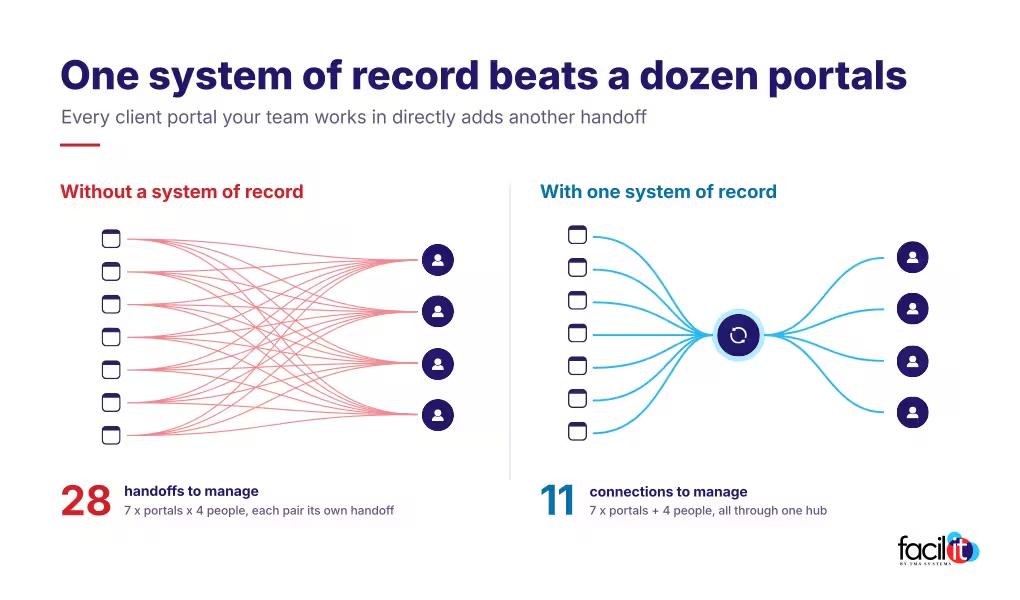
Commercial service providers often receive work through client-owned CMMS platforms and portals such as ServiceChannel and Corrigo. Each platform can have its own priorities, statuses, approval rules, and closeout requirements.
As the client base expands, coordinators spend more time moving among systems. They monitor several portals for new work, create internal records, update statuses, and send completion details back to each client environment. This re-keying between screens is commonly called swivel-chair work.
The work may be unavoidable at the client boundary, but the administrative burden does not scale well. It also increases the chance of delays, conflicting data, and missed updates.
Client portals should remain part of the workflow without becoming separate operating environments that divide the provider’s business.
The commercial cost: Swivel-chair work grows with volume and consumes coordinator capacity. A few minutes of re-keying on one job may seem minor, but the same effort repeated across every work order and portal shifts employees away from service and into data entry.
2. No one can see all open work in one place
A client portal can show activity for one account. It cannot represent the provider’s entire operation.
Operations and executive leaders need one view of total work volume, open and aging jobs, SLA exposure, technician and subcontractor capacity, pending approvals, and completed work that is not ready to bill.
If basic questions require spreadsheets, email threads, and reports from several systems, the provider does not have a dependable provider-side system of record.
That gap becomes more serious as the operation grows. Leaders cannot manage capacity, service performance, and account economics when the information is scattered.
The commercial cost: Without one view, capacity problems often appear first as missed SLAs rather than advance decisions about hiring or subcontracting. Leaders also struggle to distinguish accounts that are profitable from accounts that are simply busy.
3. Dispatch decisions depend on individual knowledge
Experienced dispatchers hold valuable operational knowledge. They know which technicians have the right skills, which subcontractors respond reliably, and which clients have unusual requirements.
That judgment matters, but it cannot be the only place the information exists.
With more volume, each assignment requires the dispatcher to weigh skill, availability, proximity, client authorization, SLA risk, travel time, cost, and current workload.
When those details live in separate systems or in someone’s memory, the first available resource may be assigned without a full view of the operational and financial effect.
The right software supports dispatcher judgment by putting the relevant context in one place.
The commercial cost: Knowledge concentrated with one or two dispatchers creates operational risk whenever they are unavailable or leave the business. It also slows onboarding because new dispatchers must learn an informal system before they can work independently.
4. Employees and subcontractors follow different processes
Many commercial service providers operate with a blended workforce. W-2 technicians cover core demand, while subcontractors supply specialized trades, additional capacity, or geographic reach.
The model can support growth, but it can also create inconsistent execution.
Employees may receive work in one application while subcontractors are managed through email. Documentation standards may vary, and the office may not know whether a vendor accepted the job, arrived on site, or submitted the items needed for closeout.
Employees and subcontractors do not have to be managed in exactly the same way. Their work does need to remain visible in the same operating environment, with client requirements applied consistently.
The commercial cost: Inconsistent subcontractor management creates compliance exposure as well as service risk. If current certificates of insurance, licenses, and client-specific credentials cannot be confirmed before dispatch, the provider carries that uncertainty into every assignment.
5. SLA problems are identified after the deadline
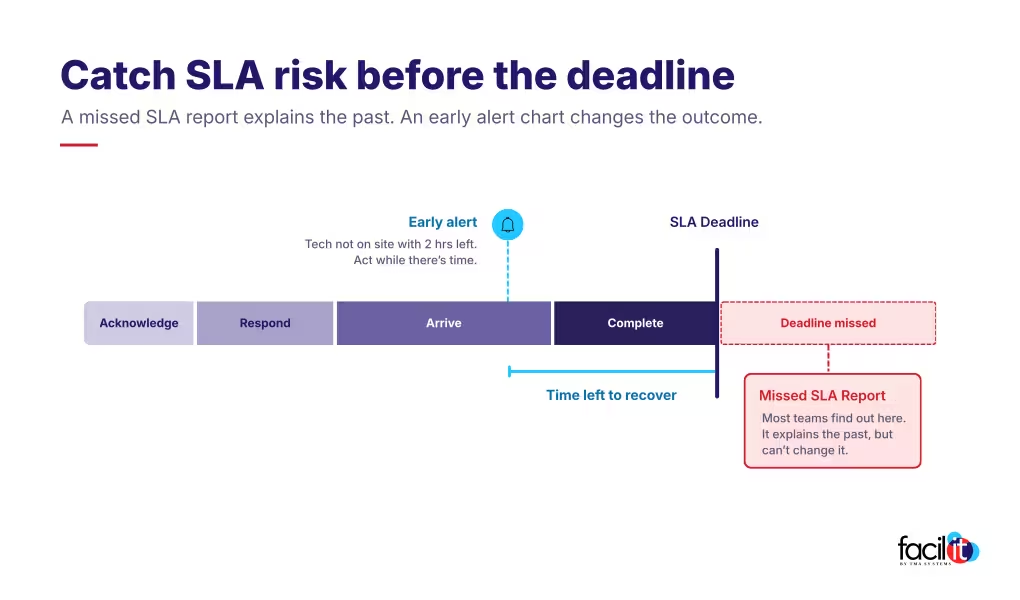
A report of missed SLAs can explain past performance. It cannot prevent the next miss.
Providers need to see risk before a work order is overdue. The correct SLA should be attached at intake, with alerts and escalation paths for work approaching a threshold.
That becomes harder when acknowledgment, response, arrival, and completion commitments differ by client, location, priority, or trade.
Manual reviews eventually break down as transaction volume rises. Effective SLA management depends on connected, current information.
The commercial cost: SLA misses surface in quarterly business reviews and contract renewals, and some agreements include penalties or fee reductions. One missed deadline can influence how the client evaluates the broader relationship.
6. Completed work waits too long for billing
Finished service does not mean the transaction is finished.
Before an invoice can be issued, the provider may need notes, labor and drive time, material costs, subcontractor invoices, photographs, forms, signatures, and approval records.
If one item is missing, completed work can remain unbilled while the office contacts field resources and reconciles records.
This is more than a finance inconvenience. Repeated delays increase administrative effort, weaken visibility into work in progress, and make cash flow less predictable.
A scalable process captures each client’s closeout requirements during execution instead of reconstructing the record afterward.
The commercial cost: Every day between completion and invoice extends the cash cycle while the subcontractors who performed the work still expect payment. For a closer look at where completed work stalls, see “From Service Request to Revenue: Managing the Complete Work Order Lifecycle.”

7. Growth requires a proportional increase in administrative staff
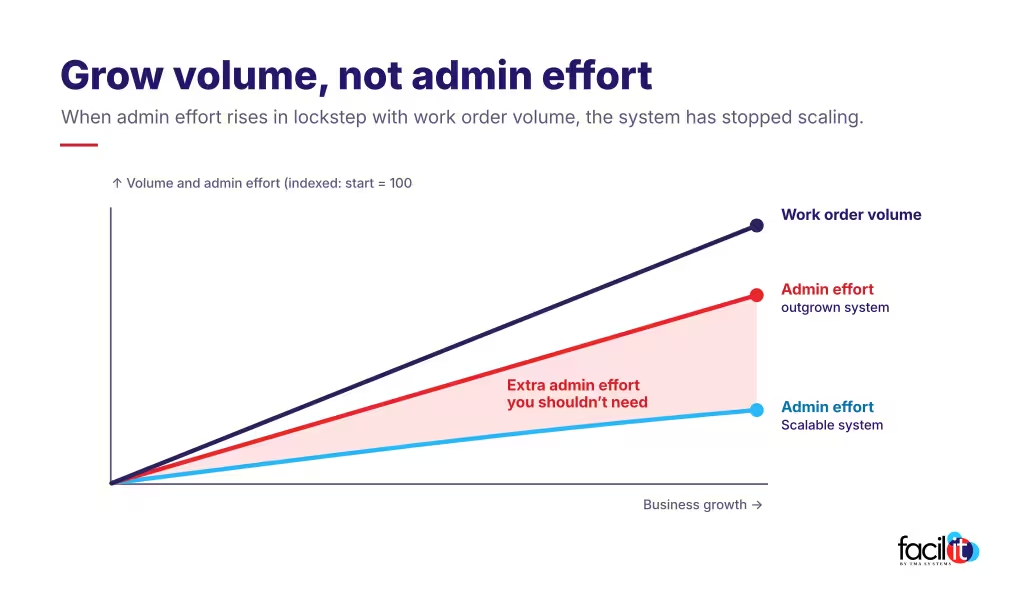
Additional work sometimes requires additional people. But when every increase in volume demands a similar increase in dispatch, coordination, and administration, the operating model is not scaling.
Employees may be compensating for disconnected systems by:
- Reentering information from client portals
- Sending routine status updates manually
- Searching for qualified resources
- Tracking SLA deadlines in spreadsheets
- Collecting completion documentation
- Reconciling client and internal records
- Preparing reports by hand
- Correcting invoice exceptions
Adding staff can temporarily absorb the work. It does not remove the complexity creating it.
The commercial cost: Track work orders completed per coordinator or administrative employee. If that measure stays flat or declines as volume rises, software is not absorbing the complexity. Payroll is.
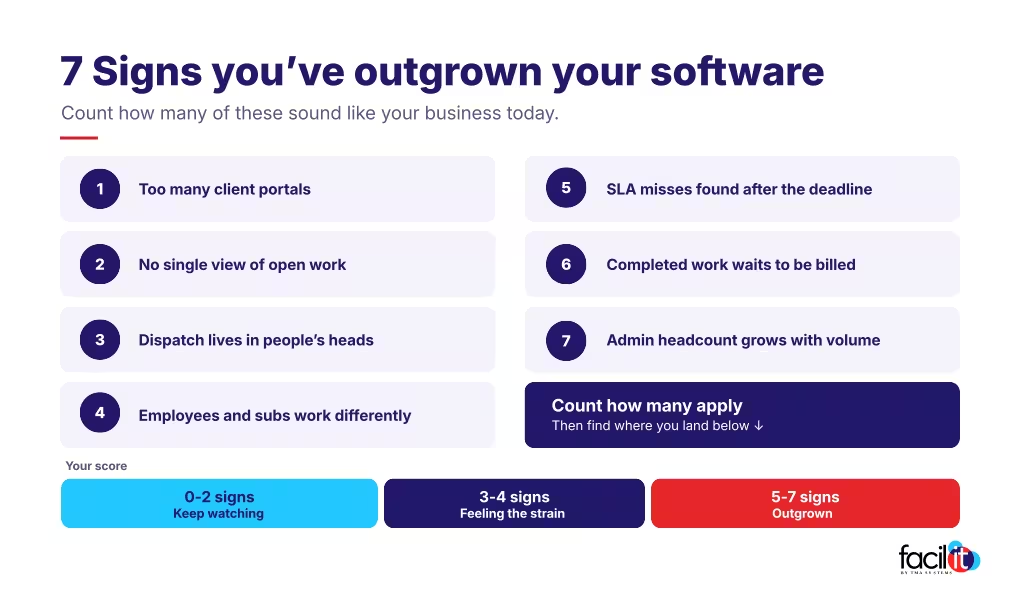
How many of these signs apply to your business?
If two or three signs are familiar, the strain is already showing. If five or more apply, the current system is limiting growth, and each new client adds more complexity to an operating model that is already under pressure.
Growth requires more than basic work order management
Outgrowing software does not necessarily mean the product failed. It may mean the business now has requirements the system was not designed to handle.
Commercial service providers need more than basic work order management. They need field service management (FSM) software for commercial service providers that supports multi-client work order management, W-2 technicians and subcontractors, SLA management, client-specific workflows, invoicing, and performance reporting.
The goal is not only to process more work. It is to increase volume without allowing administrative effort, operational risk, and cost to rise at the same pace.
Scale service without losing control
Facil-IT is field service management software built for facility and trade service providers that manage work across multiple clients, locations, and external systems.
It helps organizations centralize work, coordinate technicians and subcontractors, monitor SLAs, and connect service execution with financial and operational visibility.

FAQs about outgrowing your field service software
Related resources
From ideas to impact
You’ve read the insights, now see how TMA Systems helps teams put them into practice.